Best PC Hardware Diagnostic Tools (Web-Based & Installer) to Check Your PC Health
Wondering how to test your PC for failing hardware? These top-rated hardware diagnostic tools make it simple to detect issues with RAM, hard drives, SSDs, CPU, GPU, and more - before small problems turn into costly failures. Our team has rigorously tested leading PC diagnostic software (both web-based and downloadable installers) used by professionals and enthusiasts worldwide. These tools deliver highly reliable results, with our internal testing showing up to 98.56% accuracy (+/-).
Disclaimer: These third-party hardware diagnostic tools were consolidated and used solely for our internal testing and recommendations. No source code modifications or redirects were made. We observed no actual or consequential damage during our evaluations. Secure2pc and affiliates are not liable for any compensation related to consequential damage, performance issues, accuracy concerns, or other outcomes from using these tools. Always use them on an as-is basis.
Step 1
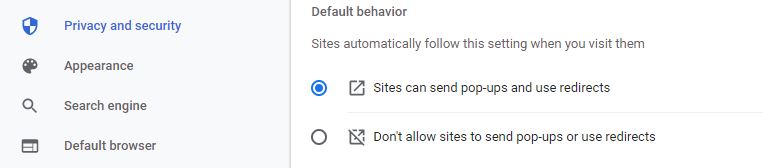
Paste following url in Google Chrome browser address bar chrome://settings/content/popups and Enable pop-up blockers as shown in below screenshot. This is applicable to enable basic testing in one click.
. 
Step 2
By clicking the following button, it will redirect you to the multiple website to start basic level diagnostic.
Step 3 (Optional)
Following test can be used to verify each diagnostic seperately. Before downloading advance tools must inform customer and ensure tool / installer removed after usage. All advance tools are installed once and after usage it should be deleted (As tools create temporary event / leave trace in user system).
Basic Level Test (Browser Needed)
- Camera Test
- Mic Test
- Keyboard Test
- Sound Test
- Temperature Monitor
- Monitor Device [Advanced Tool → Summary of Device]
- Screen Test
- TouchPad Testing Tool
- USB Power Testing
Open Device Manger -> Check Section Universal Serial Bus - System Information
Press Windows + R key then Type systeminfo - Battery Health Checkup
Advanced Level Test (Tools Download)
- Hard Disk Heath Checkup (Seagate)
- System Hang Analysis
- System On and Off Log - System Last Used Status
- Product or Activation Key Extract
Option 1 - Download Third Party Tool
Option: 2 - Command Prompt - OS Activation Key
- Press Windows key + R Type CMD click Ok
- Copy & Paste below string wmic path SoftwareLicensingService get OA3xOriginalProductKey
- Last Activity on Windows
- Drivers Installation Status
- WiFi / Network Last Connected Details
- Battery Charge History
- Free Data Recovery [Upto 2 GB]
- Memory Optimization Tool